

Request for J7 Calibration Command in AR4 Software
Hello. I would like to add an autocalibrate J7 command in tab number 0 in the code so the robot calibrates J7 with the rest of the joints upon startup. There is an Autocalibrate CMD command but nothing for external joints. Is there a way to do this?
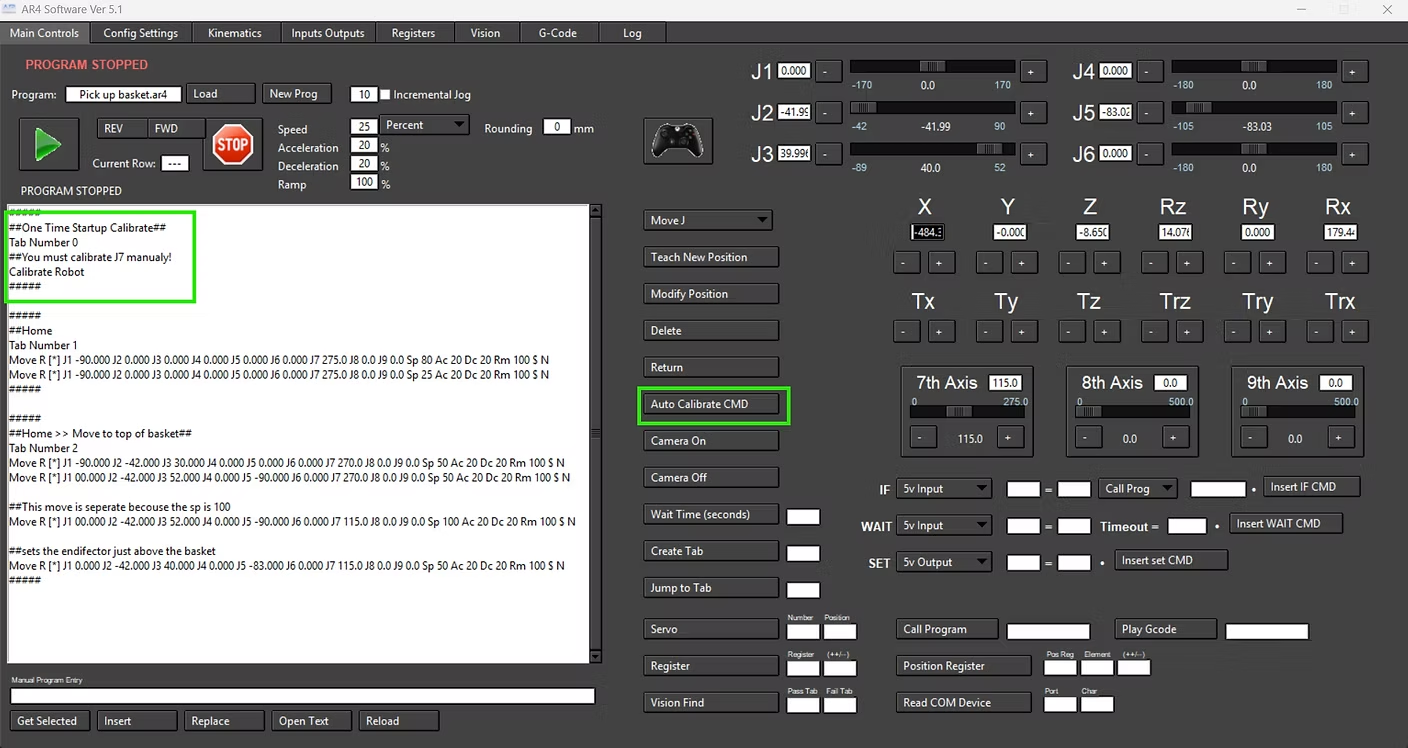
I asked ChatGPT, and it gave me some suggestions for editing the software, but I'm not sure if they are correct. I can't share the chat, but here are the screenshots:


Hello, thank you for the 5.2 source code. I'm currently running into a problem where after converting the python code to an executable file, the executable file will not load when I try to open it. I have included a screenshot of the problem below. I am currently using Python 3.13.2 and I followed the step-by-step instructions provided in the ReadMe text file. Can you please provide me with further assistance on this issue? Thanks!



3 replies
Chris Annin
I added some code to a beta version 5.2 for the HMI interface. Here is the source code - I didnt get a chance to fully test but if you have python installed you can try running this. I didnt make a button to insert the command automatically but you can use the manual entry field and insert "Cal_J7" into your program. Let me know if this works - I'll add buttons and clean it up when I get some time and ready to release 5.2 Im not sure about the GPT suggestion but the individual calibrate is already there - I just added and executeRow def for all the individual joints:
##Calibrate J7##
if (cmdType == "Cal_J7"):
if (moveInProc == 1):
moveInProc == 2
calRobotJ7()