

AR4 PC interface scrollbar blocked in program window – how to fix?
I’m having an issue with the AR4 robot’s PC interface: the scrollbar in the program-edit window is covered and unusable. How can I fix this?
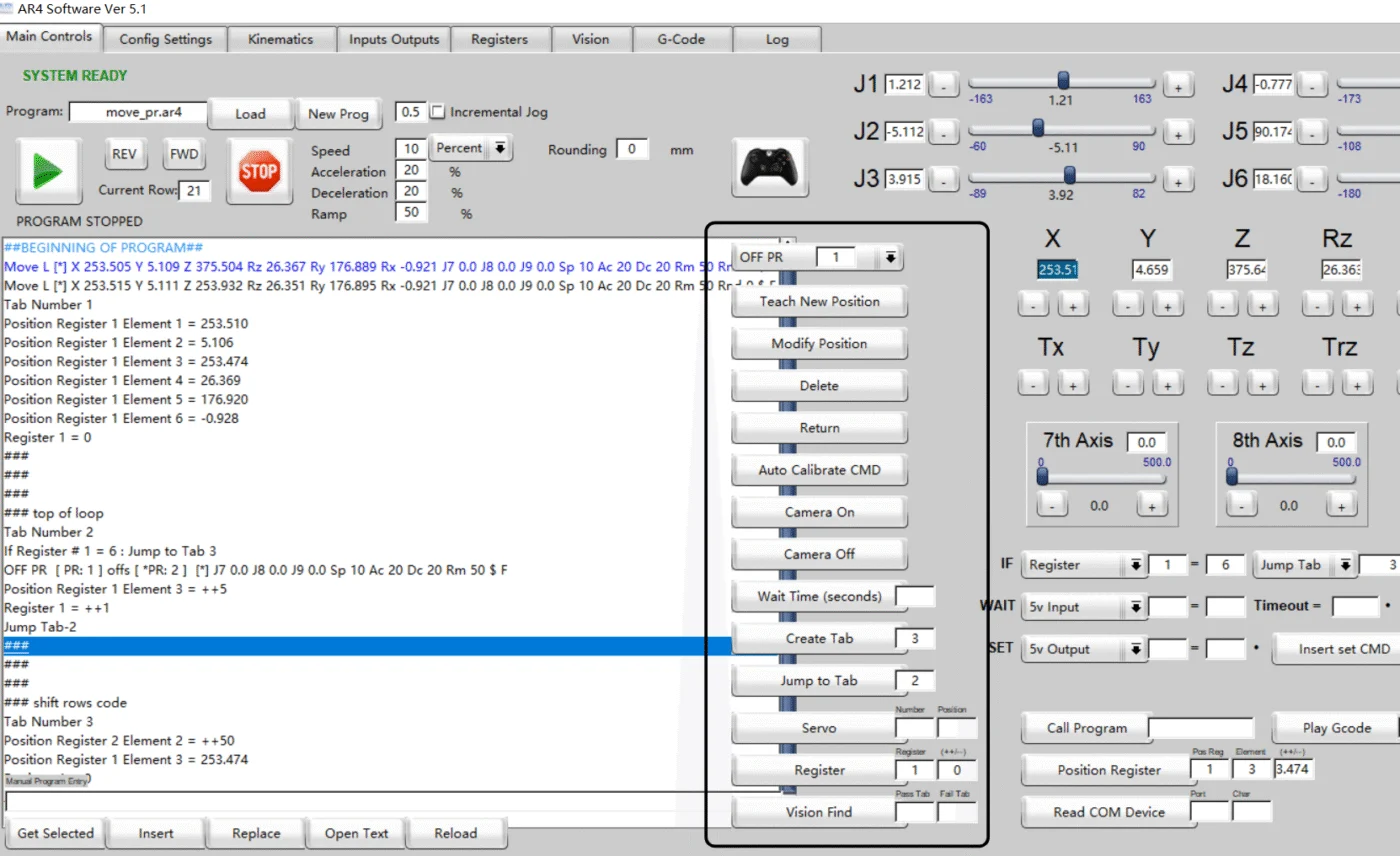

Hello, the HMI interface is sized for 15" and larger laptop screens. I would suggest checking your display screen size scaling and change it to 100% if its currently set to 125%. Let me know what screen size you are working with.

Hi Chris,
I already tried adjusting the display scaling to 100%, but the scrollbar in the program-edit window is still covered and unusable.
My screen size is 16" and the resolution is 2560x1600.
Do you have any other suggestions to fix this issue?
Thanks!
Hello, This is a new issue I haven't seen. have you also tried the latest version 6.2? Here are some additional ideas:
Here are a few approaches you can try:
1. Run the program in Compatibility / High DPI Override mode
- Right-click on the AR4 software shortcut → Properties.
- Go to Compatibility tab → click Change high DPI settings.
- Under High DPI scaling override, check Override high DPI scaling behavior.
- Set the dropdown to System (Enhanced) or Application.
- Apply and restart the software.
This often forces Windows to scale the app differently and restores missing UI elements.
2. Use a lower resolution (temporarily)
Even though your laptop’s native res is 2560×1600, some 16″ screens make certain programs appear cramped. Try:
- 1920×1200 or 1920×1080 with scaling at 100%.
- This should give the app more vertical space to show the scrollbar fully.
3. Check Windows text size / custom scaling
In Settings → Display → Scale & layout, confirm that custom scaling isn’t active (sometimes Windows applies values like 125% even when “100%” is shown). Resetting to 100% default scaling can help.
4. Use “Maximize” vs “Restore Down”
Sometimes AR4’s editor scroll area is cropped only when maximized. Try resizing the window manually in Restore Down mode and see if the scrollbar appears.
5. Multi-monitor workaround
If you have an external monitor with more vertical pixels (e.g., 1920×1200 or 2560×1440), try dragging the AR4 program there. That usually gives enough height to expose the scrollbar.
This problem exists in Korea as well. It's not resolved, perhaps due to the Korean font.