
Windows 10 Support?
Hey Chris, I built the robot and wired everything up. I was trying to run my first test today but when I tried to run the exe, it just opens as a text file. I'm running Windows 10 Pro. Does the exe support windows 10? If not, is there a workaround?
Thanks!

Hey Stephen, I’ve been running the AR2 software on a Win10 machine, with no problems. I saw your post a while ago but didn’t comment because I thought saying “it works for me” wouldn’t be helpful. I loaded up the exe folder on another Win10 machine and ran into the same issues you did - it opened a text file. So I installed python, thinking that would be the trick. Still opened a text file. I finally realized my mistake...you want to click the file above it, with the description “Application” not the one with the name “AR2.exe”. I just opened the files on another Win10 machine, one which doesn’t have python installed, and the correct application opened up with no issues. I’ll attach a screenshot to hopefully show what I’m talking about. Hopefully this helps...you shouldn’t need to install a bunch of extra things just to get the exe to run - that’s the point of the exe, it’s already compiled with everything it needs.
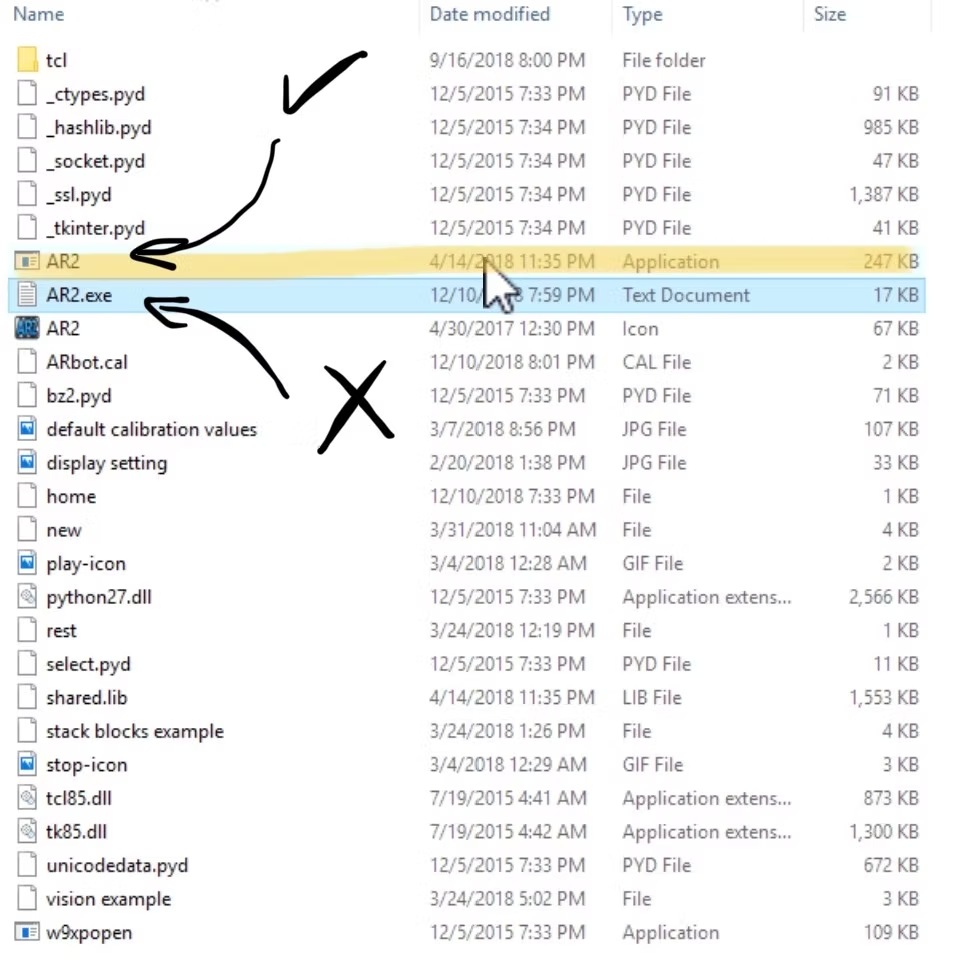
3 replies
Chris Annin
The AR2 program was written using python 2.7 on windows 7 x64 and py2exe was used to make the executable. Unfortunately I dont have a Windows 10 machine to test with but looking at the py2exe site http://www.py2exe.org/index.cgi/Tutorial section 5.2 lists some dependencies for python 2.7 which may help. Is there a log file in the AR2 program folder?