


I’m in the start-up phase of the AR4 right now. When I jog a joint by 10°, I measure about 10° ± 0.5°. Is that normal, or could there be an issue?
When I jog in Cartesian coordinates along the Z-axis, the gripper doesn’t stay level but tilts by about 8° over the full travel distance. Could this be related to the problem I mentioned above, or could it be that the coordinate system referenced is rotated?
Error Reporting
1: It seems the kinematic functions of my custom robot and the AR4 robot don't match.
I've attached the custom ARBOT.CAL for version 6.21.
If I lower the Z-axis twice, the 5th and 2nd axes move.
Tested again after lowering it to version 5.1.
Video attached
2: If I return to the origin with Move R joint movement and then move an axis, the coordinates disappear (AR4 ver. 6.21). Same problem.
Move L has the same problem. This occurs after returning to the origin.
Move J displays normal coordinates.


I've just completed the construction of my AR4-MK3. Upon testing, I've discovered that J3 is not working. Everything else is working great, and it's difficult to hold in my excitement! But J3, when I jog it, jitters. It just somewhat shakes. Sometimes I get the "J3 Collision or Motor Error" log. When I run J3's calibration, it jitters for the first half, but moves smoothly during the second half (weird...). I also ran the encoders test and all seem to be working, including J3's encoder.
It would seem J5's limit switch is not working, but I imagine that would not affect J3. J3's limit switch is in fact working. Additionally, when powered off, I can manually move J3 very smoothly and easily. No mechanical friction that would prevent a motor from turning.

Hey Team,
Has anyone used a tiny compressor such as this for the manipulator?
https://www.amazon.com/Timbertech-Professional-Upgraded-Airbrush-Compressor/dp/B07VT2F5N9/ref=sr_1_6?crid=1I87P228LWB68&dib=eyJ2IjoiMSJ9.lLmjErR0etxQSqBgrSJG8sS6Njir8uE6OGtSPjwyj4_3eDpe-U4UoANReXVnKR3K24pm4BXz76FoEqbneQm4eN-cRRkddT_6o690Z4kyHKu7NBNdXRT6_pl2iAdfBNx3z5tjzXZGN0jmHl6YmAqvzcoOO0ovv45RU8uNIfno1INSMmZPfb4l_DSixRRzRSsHHzDdZGUiAZuk33nPun_PDv_or-_b5F6N8jXa2xWAGTefJHPRSd0tcyeSxJOk-xzPkDrSRuVmWdF3ogi0P-JzpZvqfK7pUc_btPzIxKhwooQ.i8Y2nzPm99uRBuOTVvu_H4OnBuRnZzpuy2G8iJP8oOA&dib_tag=se&keywords=airbrush+compressor&qid=1760899748&sprefix=airbrush+compress%2Caps%2C210&sr=8-6
It looks like it has enough pressure and seems quite.
Cheers,
J
Hello Team,
I have an older AR4 MK1 that I want to update. I've attached the dip switch settings from the MK1 and MK3 and the driver settings for the DM542T's which my MK1 uses.
Can i adjust SW5-8 so that they are doing 1/8 steps (OFF, OFF, ON, ON - respectively... J4 and J5 will be different). Will making these changes allow me to use code versions 6.1?
Cheers,
J
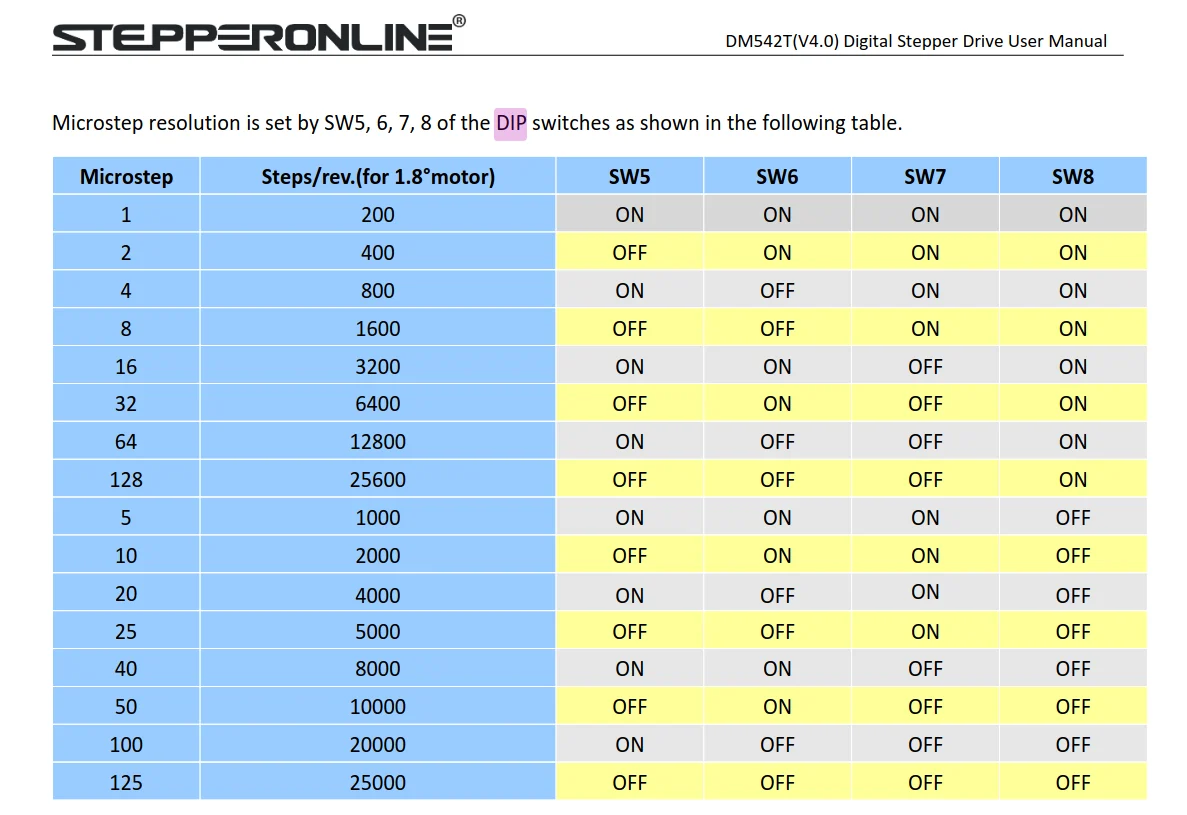
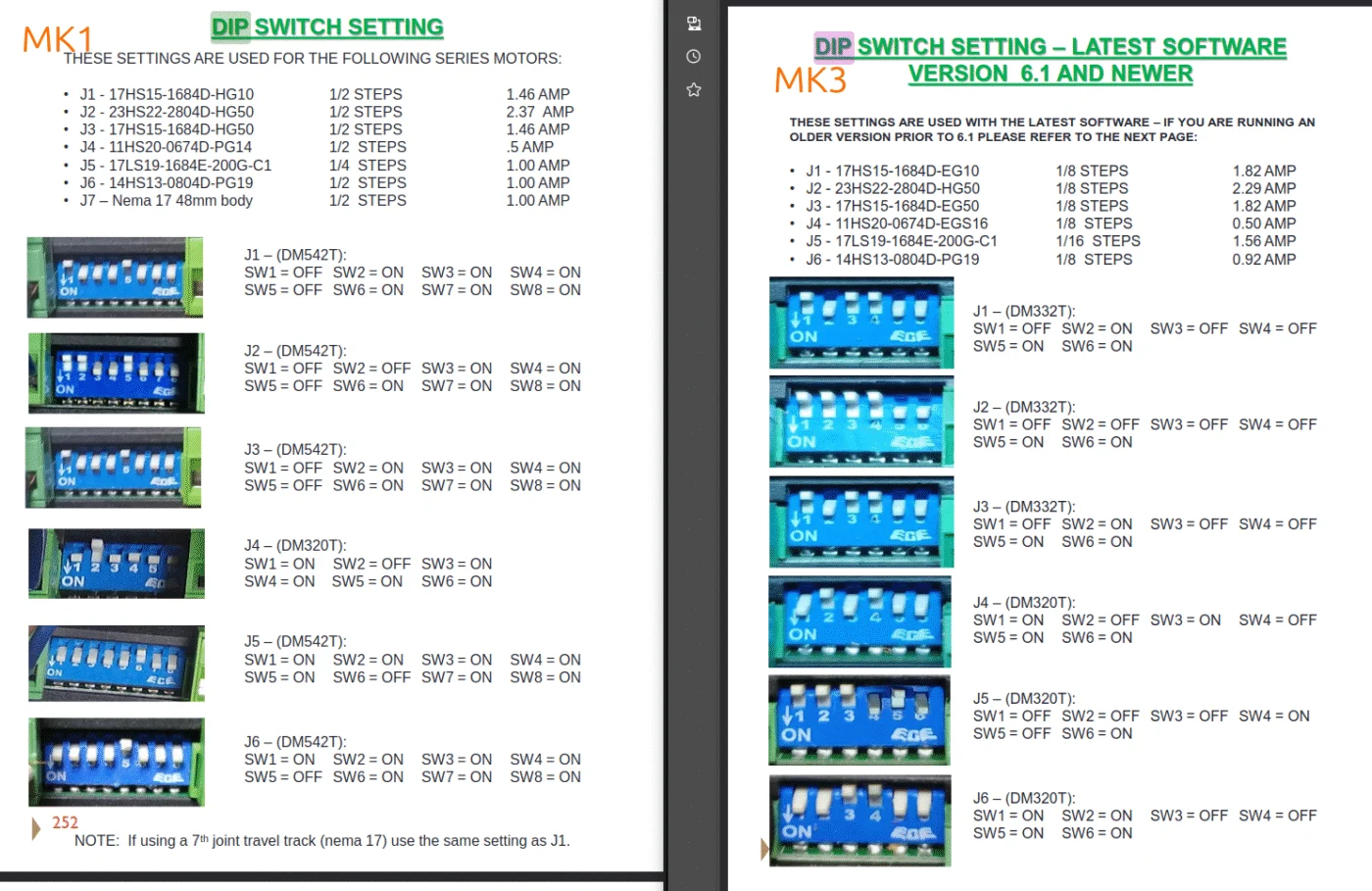

just starting my robot and after a few minuets I noticed that the j4 motor was extremely hot, enough to burn if I touch it. I double checked my dip switches and is correct for software ver. 6.2.1 on,off,on,off,on,on. Any advice here as I'm sure this isn't normal.
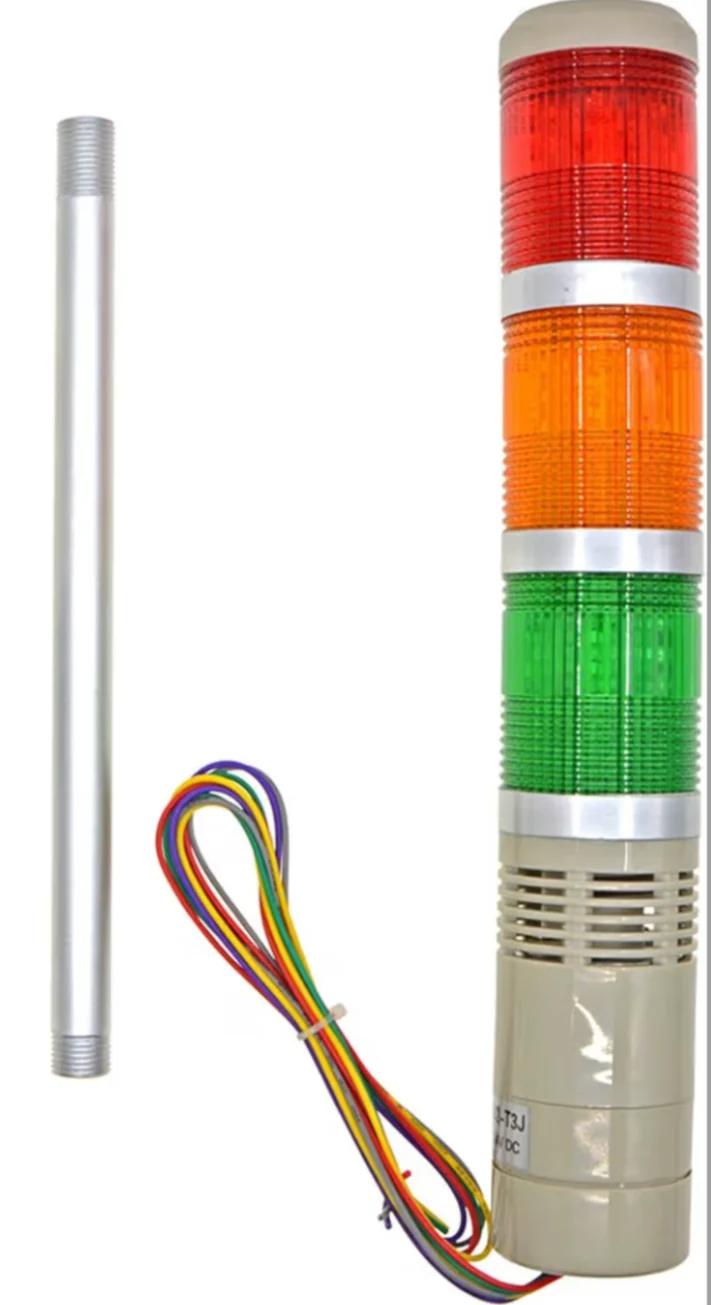
Is there a way to hook up status lights? I'm building 5 robots to stack paper in a printshop. I would like to have 3 separate colors for (ready) (working) and (error) so that the status can be seen across the room. These should pick up on the status indication of the software.

Are there any plans to release the clear arm cover files for the AR4? I have a friend with a laser cutter/engraver and would prefer to just make my own so I can personalize it a bit, but if the files belong to CI then I can model it myself but would prefer to be lazy if that's an option :)
P.S. loving v6.2- the xbox controls are dramatically more intuitive, I spent a good 30 minutes just playing with my robot after updating.

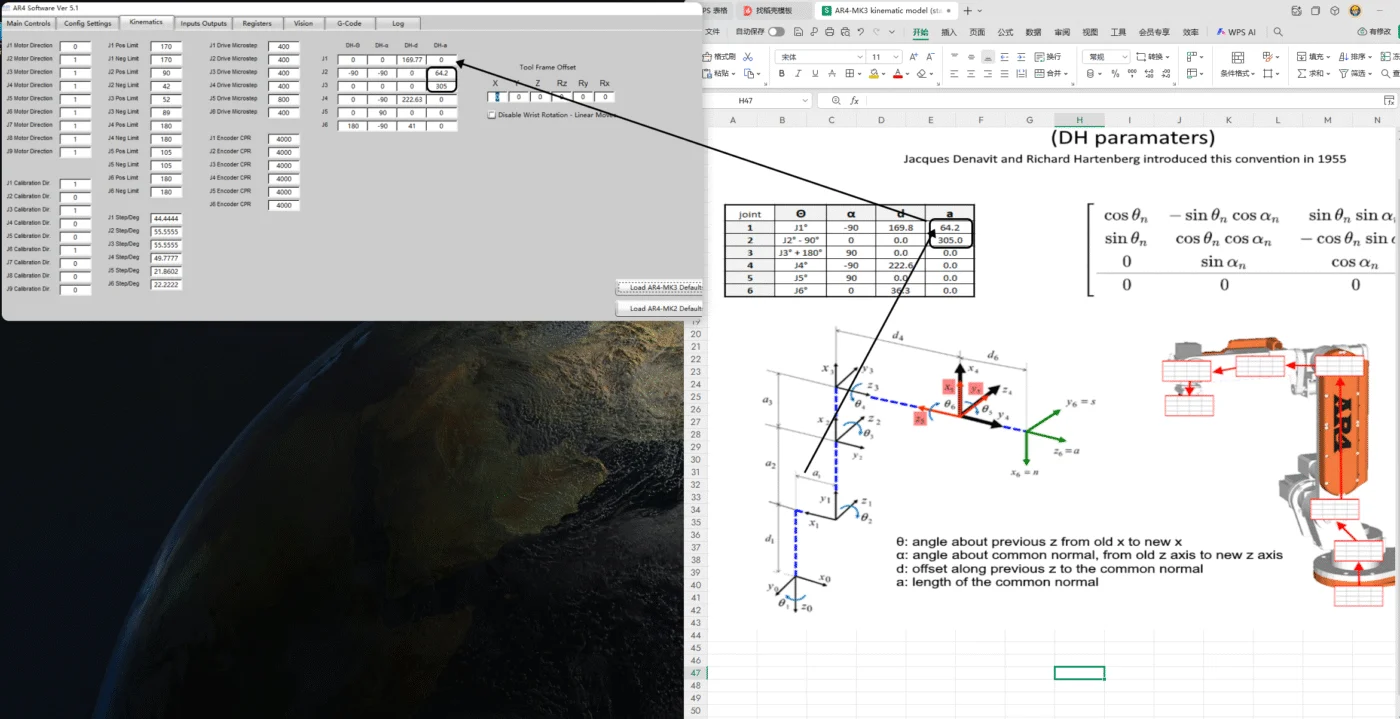
Dear Chris Annin,
I'm writing to consult you about an issue with the DH parameters.
The DH parameter table in the left-side software doesn't match the one in the spreadsheet. For instance, the corresponding value of a₁ is 64.2, which is correctly filled in the "a" column corresponding to the J1 axis in the spreadsheet. However, in the host computer software, this value is filled in the next row.
Could you please help explain why this discrepancy occurs?
Thank you for your time and assistance.
Best regards,
[Zhongyuan.Duan]

I would like to create a program that makes a waving motion in a repeated pattern. I would like it to be able to do this on startup. My desired program will turn on the AR4, calibrate its position, then go through a series of positions, then a sleep position so that it restarts in a predictable position for the next time. Pretty basic right? I'm having two problems. The first is that the machine doesn’t connect immediately with my computer, I must power cycle the robot and close and unclose the windows executable file until they connect. Is there a recommended way to cycle it on?
The second problem is with homing. Homing is great because it’s a baseline state for the joints, so then I can program them to move relatively using MoveJ operations. However, when I calibrate the robot, it moves to a certain gesture. When I calibrate it a second time it results in a different end gesture. How do I make sure I can calibrate and have a baseline gesture that my program can extend from?
Also, before the program is over, the wand must move to a “sleep” position so that I can assure that the robot starts in an orientation that after calibration will result in a predictable baseline position. Is this the standard approach for running the robot for an application? Is there a trickshot to creating movement cycles that can be recreated after a power cycle?